S
STLPhilApr 30, 2019
I need to remove the cell padding on top-links on mobile devices. I have attached a picture
URL: https://trafficlawservices.com/
trafficlawservices.com/
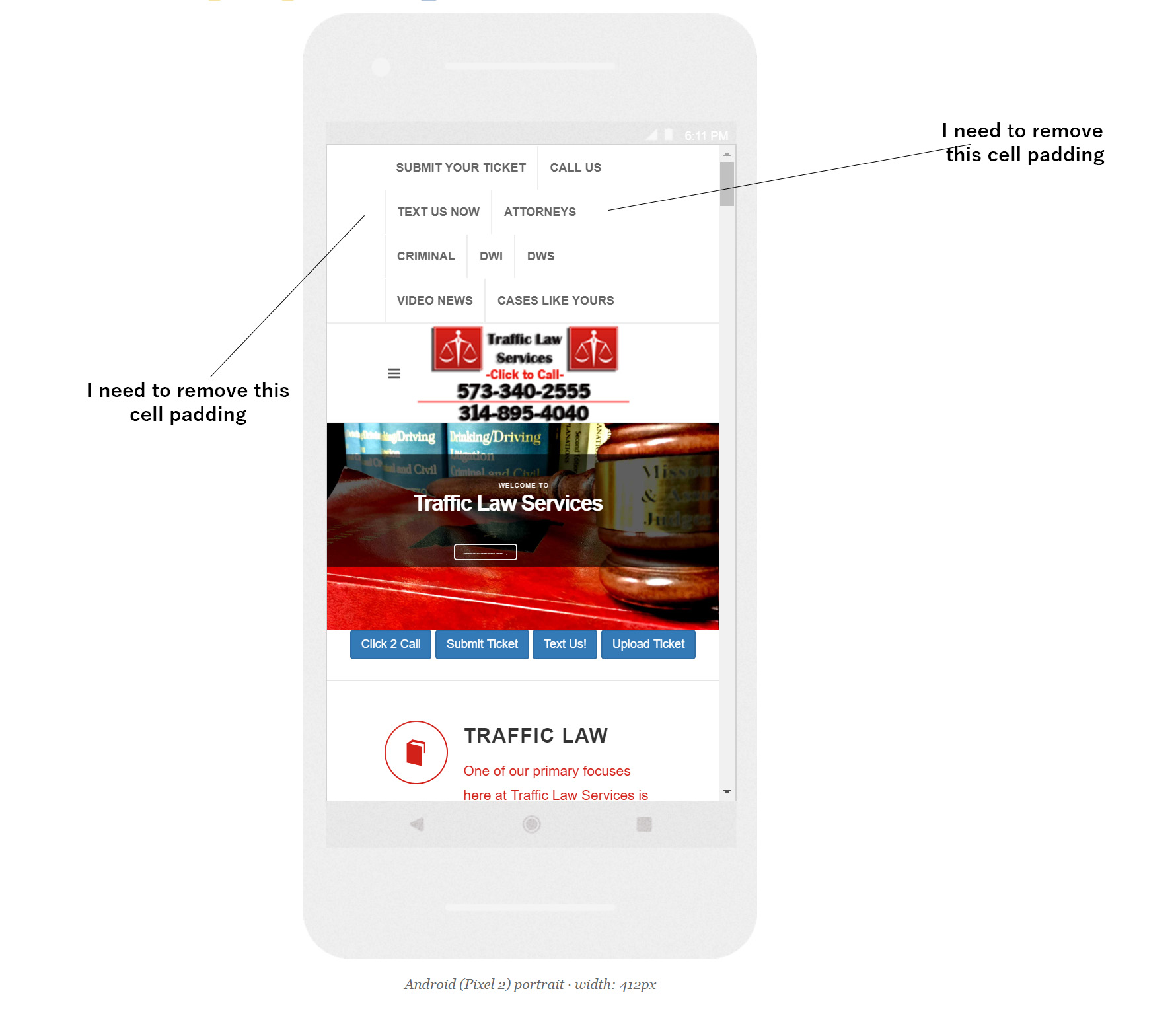

I need to remove the cell padding on top-links on mobile devices. I have attached a picture
URL: https://trafficlawservices.com/
trafficlawservices.com/
Hello,
Consider using this CSS Codes to change the Values of the Spacing in the Top Links:
#top-bar {
	line-height: 44px;
}

.top-links ul li {
	height: 44px;
}

.top-links li > a {
	padding: 0 12px;
	height: 44px;
}
and if you would just like to change these values on a Mobile Device, use the following codes:
@media (max-width: 991.98px) {
	#top-bar {
		line-height: 44px;
	}

	.top-links ul li {
		height: 44px;
	}

	.top-links li > a {
		padding: 0 12px;
		height: 44px;
	}
}
This will definitely work fine. Hope this Helps!
Let us know if we can help you with anything else or if you find any further issues.
I changed the coding in style.css but its still not working. Do I need to change the responsive.css file?
Top Links
-----------------------------------------------------------------*/
@media (max-width: 991.98px) {
#top-bar {
line-height: 44px;
}
.top-links ul li {
	height: 44px;
}

.top-links li > a {
	padding: 0 12px;
	height: 44px;
}
}
.top-links {
position: relative;
float: left;
}
.top-links ul {
margin: 0;
list-style: none;
}
.top-links ul li {
float: left;
position: relative;
height: 44px;
border-left: 1px solid #EEE;
}
.top-links ul li:first-child,
.top-links ul ul li { border-left: 0 !important; }
.top-links li > a {
display: block;
padding: 0 12px;
font-size: 12px;
font-weight: 600;
text-transform: uppercase;
height: 44px;
color: #666;
}
.top-links li i {
position: relative;
top: 1px;
}
.top-links li i.icon-angle-down { margin: 0 0 0 2px !important; }
.top-links li i:first-child { margin-right: 2px; }
.top-links li.full-icon i {
top: 2px;
font-size: 14px;
margin: 0;
}
.top-links li:hover { background-color: #EEE; }
.top-links ul ul,
.top-links ul div.top-link-section {
display: none;
pointer-events: none;
position: absolute;
z-index: 210;
line-height: 1.5;
background: #FFF;
border: 0;
top: 44px;
left: 0;
width: 140px;
margin: 0;
border-top: 1px solid #1ABC9C;
border-bottom: 1px solid #EEE;
box-shadow: 0 0 5px -1px rgba(0,0,0,0.2);
-moz-box-shadow: 0 0 5px -1px rgba(0,0,0,0.2);
-webkit-box-shadow: 0 0 5px -1px rgba(0,0,0,0.2);
}
.top-links li:hover ul,
.top-links li:hover div.top-link-section { pointer-events: auto; }
.top-links ul ul li {
float: none;
height: 36px;
border-top: 1px solid #F5F5F5;
border-left: 1px solid #EEE;
}
.top-links ul ul li:hover { background-color: #F9F9F9; }
.top-links ul ul li:first-child {
border-top: none !important;
border-left: 1px solid #EEE;
}
.top-links ul ul a {
height: 36px;
line-height: 36px;
font-size: 12px;
}
.top-links ul ul img {
display: inline-block;
position: relative;
top: -1px;
width: 16px;
height: 16px;
margin-right: 4px;
}
.top-links ul ul.top-demo-lang img {
top: 4px;
width: 16px;
height: 16px;
}
.top-links ul div.top-link-section {
padding: 25px;
left: 0;
width: 280px;
}
.fright .top-links ul div.top-link-section,
.top-links.fright ul div.top-link-section {
left: auto;
right: 0;
}
Hello,
Make sure that you do not change anything in the Default Files and use the css/custom.css File to paste the codes we have provided you above so that when we release updates you do not have to worry about your Customizations. For complete instructions on how to use the css/custom.css File, please check the Documentation > Start > Customization Section.
This will definitely work fine. Hope this Helps!
Let us know if we can help you with anything else or if you find any further issues.
Have the same question, or something new?
Sign in to the Canvas dashboard to reply or open your own topic. Canvas owners get direct help from the SemiColonWeb team.
Reply on the dashboard